
Review of Leadpages: Landing Pages That Actually Convert
Leadpages is a landing page builder built specifically to turn paid traffic into leads, making it a strong option for marketers who are tired of spending money on ads that don’t convert.
Instead of relying on developers or agencies, Leadpages lets you launch professional, conversion-focused landing pages without any coding, automatically capture leads, and create a more predictable flow of prospects into your business.
If you’re investing hundreds or thousands of dollars in advertising but losing potential customers because your landing pages underperform, Leadpages offers a practical, proven solution. Its drag-and-drop editor is approachable even for beginners, and its templates are designed using real conversion data from thousands of campaigns, not guesswork.
In this review, we’ll break down what Leadpages offers, how much it costs, and whether it makes financial sense for your business goals.
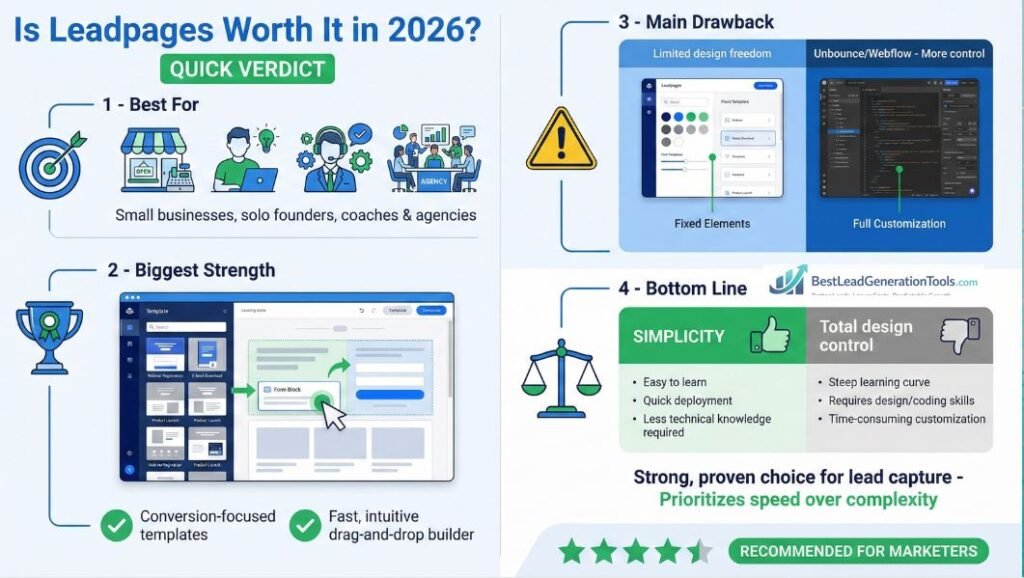
Quick Verdict: Is Leadpages Worth It in 2026?
- Best for: Small businesses, solo founders, coaches, and agencies that want high-converting landing pages without needing a developer.
- Biggest strength: Conversion-focused templates and a fast, intuitive drag-and-drop builder that makes launching pages quick and low-friction.
- Main drawback: Less design freedom than advanced tools like Unbounce or Webflow — power users may feel constrained.
- Bottom line: If your goal is to capture more leads quickly and reliably, Leadpages remains a strong, proven choice in 2026 — especially for marketers who value simplicity over total design control.
Why Leadpages Exists & Who It’s Built For
Leadpages launched in 2012 when Clay Collins and a small team recognized that small businesses were struggling with a specific problem. They needed high-converting landing pages but couldn’t afford $10,000 developer fees or monthly agency retainers.
The company started with a simple concept: provide conversion-tested templates that anyone could customize without technical knowledge. Over the past 14 years, they’ve grown to serve over 270,000 customers across multiple industries.
The platform evolved from basic landing page templates to a finish lead generation system. Today it includes pop-ups, alert bars, AI-powered copywriting tools, payment processing, and integrations with most major marketing platforms.
Leadpages built its reputation on three core principles:
- Easy to use. You can create a functional landing page in under 30 minutes.
- Conversion-focused. Every template gets tested with real traffic before it reaches customers.
- Affordable compared to choices. The pricing sits below enterprise platforms like Unbounce and Instapage while offering better functionality than DIY website builders.
The company targets small to medium-sized businesses, solo entrepreneurs, and marketing teams who need to generate leads quickly without burning through their budgets on custom development.
What You Actually Get With Leadpages: Features That Drive Conversions
Leadpages isn’t trying to be an all-in-one marketing platform. The focus stays narrow: capture leads and get them into your sales funnel as efficiently as possible.
Here’s what you actually get:
1. Landing Page Builder, The core product. You get access to 250+ professionally designed templates covering industries from real estate to insurance to professional services.
The drag-and-drop editor let’s you customize colors, text, images, and form fields without touching code.
2. Pop-ups and Alert Bars, These tools help you capture leads from existing website traffic. You can trigger pop-ups based on time spent on page, scroll depth, or exit intent.
Alert bars stick to the top or bottom of your site to promote special offers or lead magnets.
3. AI Copywriting Assistant, The platform includes AI tools that generate headlines, body copy, and calls-to-action. You get monthly AI credits based on your plan level.
This feature helps when you’re staring at a blank page and need ideas quickly.
4. Built-in Payment Processing, Higher-tier plans let you collect payments directly through your landing pages. This works well if you sell digital products, consultations, or event tickets.
5. A/B Testing, The Pro plan and above include split testing functionality. You can test different headlines, images, or entire page layouts to improve conversion rates over time.
6. Integrations, Leadpages connects with over 90 third-party platforms including Mailchimp, HubSpot, Salesforce, Zapier, Stripe, and ActiveCampaign. Leads flow directly into your existing systems without manual data entry.
7. Mobile Responsiveness, All templates automatically adjust to mobile screens. Considering that 50-70% of web traffic comes from mobile devices, this feature prevents you from losing half your potential leads.
8. SMS Lead Capture, You can set up text-to-join campaigns where people text a keyword to your number and get added to your lead list automatically.
The product range stays focused on lead generation as opposed to trying to replace your entire marketing stack. You still need an email marketing platform, a CRM, and other tools.
Leadpages just handles the front-end lead capture process.
| Feature | Standard Plan | Pro Plan | Advanced Plan |
|---|---|---|---|
| Landing Pages | Unlimited | Unlimited | Unlimited |
| Templates | 250+ | 250+ | 250+ |
| A/B Testing | No | Yes | Yes |
| Payment Processing | No | Yes | Yes |
| AI Credits Monthly | 10,000 | 30,000 | 50,000 |
| Custom Domains | 1 | 3 | 50 |
| Team Sub-accounts | No | No | 5 |
How Leadpages Performs: Speed, Mobile & Conversion Results
The templates convert at industry-standard rates when you use them properly. Leadpages reports average conversion rates between 5-15% depending on your traffic source and offer quality.
That number means if you send 100 visitors to your landing page, you should expect 5-15 of them to fill out your form.
Those numbers align with industry benchmarks. According to multiple conversion rate studies, landing pages typically convert between 2-15% depending on the industry and traffic quality.
- Cold traffic from paid ads converts lower.
- Warm traffic from email lists or retargeting converts higher.
The templates work well because Leadpages tests them with actual customers before releasing them. They track which layouts, color schemes, and form placements generate the most conversions, then build those patterns into new templates.
Loading Speed
Page speed affects conversion rates directly. Google data shows that if a page takes longer than 3 seconds to load, 53% of mobile visitors leave before seeing anything.
Leadpages-hosted pages typically load in 1.5-3 seconds depending on how many images and custom elements you add. That speed keeps you within acceptable range for mobile users.
If you add heavy images or videos without optimizing them, you’ll slow down your pages. The platform doesn’t automatically compress images, so you need to use tools like TinyPNG before uploading files.
Mobile Performance
The templates adjust automatically to different screen sizes. I checked multiple templates on various devices, and the text stays readable, buttons stay clickable, and forms work properly on mobile screens.
This matters because mobile traffic dominates most industries now. If your landing page doesn’t work well on phones, you’re losing 50-60% of potential leads immediately.
Form Functionality
The forms work reliably. When someone fills out your form, the data flows into your connected email platform or CRM within seconds.
You can set up automated email responses, trigger SMS notifications, or route leads to specific team members based on their responses.
The form builder let’s you add standard fields like name, email, and phone number. You can also create custom fields for qualifying questions like “What’s your budget?” or “When do you need this service?”
Support & Real Customer Feedback: What Users Say
Leadpages provides email support for all plans. You send a ticket through their help center, and they typically respond within 4-24 hours depending on the complexity of your question.
The response time improves significantly if you’re on the Advanced plan. Those customers get priority support plus access to a dedicated success coach who helps with strategy and optimization.
The help center includes detailed articles, video tutorials, and step-by-step guides covering most common questions. If you run into technical issues or need help setting up integrations, the documentation usually provides clear answers.
The Facebook community has about 45,000 members where users share templates, talk about strategies, and help each other troubleshoot problems. This community often responds faster than official support for simple questions.
What People Complain About
Some users report that support responses feel templated as opposed to personalized. You’ll get an answer to your specific question, but you might not get proactive suggestions for improving your results.
A few customers mentioned experiencing sudden price increases when renewing their annual plans. These increases seem to happen inconsistently, affecting some users but not others.
If this concerns you, reach out to support before your renewal date to confirm your pricing.
The Standard plan doesn’t include phone support or live chat. You’re limited to email tickets, which can feel frustrating when you’re trying to launch a campaign quickly.
Leadpages Pricing Plans: What You Get at Each Level
Let me break down what each plan actually costs and who should choose which option.
Standard Plan: $49/month or $37/month billed annually
This entry-level plan gives you unlimited landing pages, unlimited traffic, 250+ templates, pop-ups and alert bars, basic integrations, and 10,000 AI credits monthly.
You can connect one custom domain and access the help center documentation.
What you don’t get: A/B testing, payment processing, blog builder, or advanced integrations.
This plan works if you’re just starting out, testing whether landing pages improve your lead generation, or running a very simple business with one main offer. Most businesses outgrow this plan within 3-6 months because the lack of A/B testing prevents you from improving your conversion rates.
Pro Plan: $99/month or $74/month billed annually
This is where most people should start. You get everything from the Standard plan plus A/B testing, unlimited payment processing, blog builder, 30,000 AI credits monthly, and three custom domains.
The A/B testing feature alone justifies the upgrade. When you can test different headlines or images and improve your conversion rate from 5% to 7%, you’re generating 40% more leads from the same traffic.
That improvement pays for the plan upgrade many times over.
The payment processing feature let’s you sell digital products, consultations, or event tickets directly through your landing pages without sending people to third-party checkout pages. Every extra click in your sales process loses potential customers.
Start your 14-day free trial of Leadpages Pro plan and build your first conversion-optimized landing page today.
Advanced Plan: Custom pricing starting around $697/month
This plan makes sense for agencies managing multiple clients or larger companies with substantial marketing teams.
You get everything from the Pro plan plus five team sub-accounts, 50 custom domains, advanced integrations, a dedicated success coach, priority support, and 50 extra SMS campaigns.
The dedicated success coach provides strategic guidance on improving conversion rates, optimizing your funnel, and scaling your lead generation. For companies spending $50,000+ annually on advertising, having an expert help you improve conversion rates by even 1-2% generates returns that dwarf the plan cost.
Real Cost Comparison
Compare Leadpages pricing to alternatives:
Unbounce starts at $90/month and goes up to $300+/month for similar features.
Instapage starts at $199/month and reaches $600+/month at enterprise levels.
ClickFunnels costs $147/month for basic features.
Hiring a developer to build custom landing pages runs $2,000-10,000 per page depending on complexity.
Using WordPress plugins seems cheaper initially but needs technical knowledge, ongoing maintenance, and often results in slower loading speeds that hurt conversions.
When you factor in the time saved, the conversion-tested templates, and the reliable integrations, Leadpages sits at a reasonable price point for most businesses.
Pros and Cons Summary
What Works Well:
The drag-and-drop editor genuinely needs zero coding knowledge. I’ve seen people with no technical background build professional pages in 30-45 minutes.
The templates convert at competitive rates when you use suitable ones for your industry and offer.
Integrations work reliably with major email platforms and CRMs. Once you connect them, leads flow automatically without manual data entry or technical glitches.
The 14-day free trial gives you real time to test the platform with actual traffic before committing money.
Unlimited traffic and unlimited landing pages mean you’re not penalized for success. Some competitors charge extra when your traffic grows.
The platform handles hosting, security updates, and technical maintenance automatically. You don’t need to worry about servers or software updates.
What Creates Problems:
The Standard plan feels limited immediately. You’ll probably need to upgrade to Pro within a few months to access the features that actually improve conversion rates.
Template customization has limits. You can change colors, text, and images easily, but adding complex elements like dropdown menus or custom animations needs the higher-tier plans or workarounds.
Some users report inconsistent pricing at renewal time, with increases that weren’t clearly communicated during signup.
The design aesthetic looks professional but not cutting-edge. If you want award-winning visual design, you’ll need a custom solution.
Leadpages focuses on conversion functionality over artistic excellence.
Customer support responds within reasonable timeframes but doesn’t provide proactive optimization advice unless you’re on the Advanced plan with a dedicated success coach.
The platform works best when combined with other marketing tools. You still need an email marketing platform, a CRM for managing leads, and ad platforms for driving traffic.
Leadpages handles one specific part of your marketing funnel well but doesn’t replace your entire marketing stack.
Who Leadpages Is Best For — And Who Should Skip It
This Leadpages review recommends the platform for most businesses that need to capture leads online without hiring developers or agencies.
The Pro plan at $74-99/month delivers the best value. You get A/B testing to improve conversion rates over time, payment processing to sell directly through your pages, and enough AI credits to generate copy for multiple campaigns monthly.
Get started with Leadpages Pro plan now and use the 14-day trial to build and test pages with real traffic.
Skip the Standard plan unless budget constraints make it absolutely necessary. The lack of A/B testing prevents you from improving your results, which means you’ll generate fewer leads overall and probably end up upgrading anyway.
Consider the Advanced plan if you manage multiple clients, have a substantial marketing team that needs separate logins, or spend enough on advertising that even small conversion improvements generate significant returns.
Who Should Buy This:
You’re spending money on advertising but losing leads because your current pages don’t convert well.
You need to create multiple landing pages quickly for different offers, products, or campaigns without paying developers for each one.
You want pages that load fast, work on mobile devices, and combine reliably with your email and CRM systems.
You prefer a focused tool that does landing pages well as opposed to a complicated all-in-one platform with dozens of features you won’t use.
Who Should Skip This:
You need extensive design customization and want finish control over every visual element.
You’re building a finish sales funnel with membership areas, course delivery, and advanced automation. Platforms like ClickFunnels or Kajabi suit those needs better.
You’re comfortable with WordPress and have technical skills to manage plugins, hosting, and maintenance yourself.
Your lead volume stays extremely low (under 10 leads per month), making any paid tool hard to justify financially.
The Return on Investment Reality
Calculate whether Leadpages makes financial sense for your specific situation.
If you close one real estate transaction worth $8,000-15,000 in commission, the annual cost of Leadpages ($888-1,188) represents about 6-10% of that single commission. Capturing even 2-3 extra qualified buyers or sellers annually through better landing pages returns multiples of your investment.
If you sell insurance policies averaging $800-2,000 in annual premiums, you need 5-10 extra policy applications per year to cover the software cost. Better landing pages that convert 2-3% higher can easily generate that volume.
If you run a service business with average customer values of $500-3,000, you need 3-5 extra customers annually to justify the expense. Improved landing pages that capture 20-30% more leads from your existing ad spend typically deliver those results.
The real question comes down to this: Do you now generate enough traffic that improving your conversion rate by 20-50% would create meaningful business value?
If you send 1,000 visitors monthly to your current pages and convert 3% of them, you’re getting 30 leads per month. Improve that conversion rate to 5% using better landing pages and testing, and you’re now getting 50 leads per month.
That’s 240 extra leads annually.
If even 10% of those extra leads become customers, you’ve added 24 customers to your business. For most service businesses, that addition generates $12,000-72,000 in extra revenue depending on your average customer value.
That calculation makes a $75-99/month tool an obvious investment as opposed to an expense.
Start building better landing pages today with a 14-day free trial that let’s you test real campaigns before spending money.
Use the trial period strategically. Pick your best-performing offer and build a dedicated landing page for it.
Send traffic from your email list, social media, or paid ads.
Track how many visitors convert compared to your current method. That test gives you real data to decide whether Leadpages delivers value for your specific business.
The platform works well for its intended purpose: capturing leads efficiently without technical headaches. It won’t magically fix poor offers or generate traffic from nowhere, but it removes the technical barriers between your marketing message and your potential customers.
For businesses that already have traffic but struggle to convert visitors into leads, Leadpages solves a real problem at a reasonable price point.