
You can spend thousands of dollars driving traffic to your website…and still walk away with nothing.
Clicks don’t build pipeline. Visitors don’t schedule calls. Page views don’t create revenue.
If the pages those visitors land on aren’t designed to convert, every dollar invested in ads, SEO, email campaigns, or social media quietly drains out of your funnel.
For B2B marketing managers juggling multiple campaigns, real estate agents trying to capture serious property inquiries, small business owners watching ad budgets disappear without predictable return, or insurance agents who rely on steady lead flow – the issue usually isn’t traffic alone.
It’s conversion.
Most websites are built to inform. They describe services, showcase credibility, and explain what the business does. But they rarely guide visitors toward a single, intentional action.
Landing pages are built differently. They exist to do one thing well: turn interest into measurable outcomes.
That gap – between attracting attention and generating action – is where most marketing efforts break down.
It’s also where Leadpages has positioned itself since 2012.
Rather than competing on complexity or custom development, Leadpages focuses on a specific objective: helping businesses turn inconsistent lead generation into a structured, repeatable system.
What makes the platform compelling is the balance it strikes. It removes technical friction without sacrificing meaningful optimization capability.
You don’t need a developer. You don’t need advanced conversion rate expertise. And you don’t need a full marketing team to launch campaigns that are engineered to perform.
When conversion improves, everything else in your marketing becomes more effective. Traffic becomes more valuable. Ad spend stretches further. Campaign performance becomes predictable instead of volatile.
In this guide, we’ll examine exactly how Leadpages works, what each pricing tier includes, when the Pro upgrade makes strategic sense, how to configure forms for higher-quality leads, and how to optimize campaigns for measurable performance.
If conversion is the missing link in your marketing system, understanding how Leadpages approaches it is worth your attention.
Understanding What Leadpages Actually Does
Leadpages solves a very specific problem: the gap between getting someone to visit your website and getting them to actually give you their contact information or make a purchase. Traditional websites are designed to provide information, tell your story, show your portfolio.
Landing pages are designed to do exactly one thing: convert visitors into leads or customers.
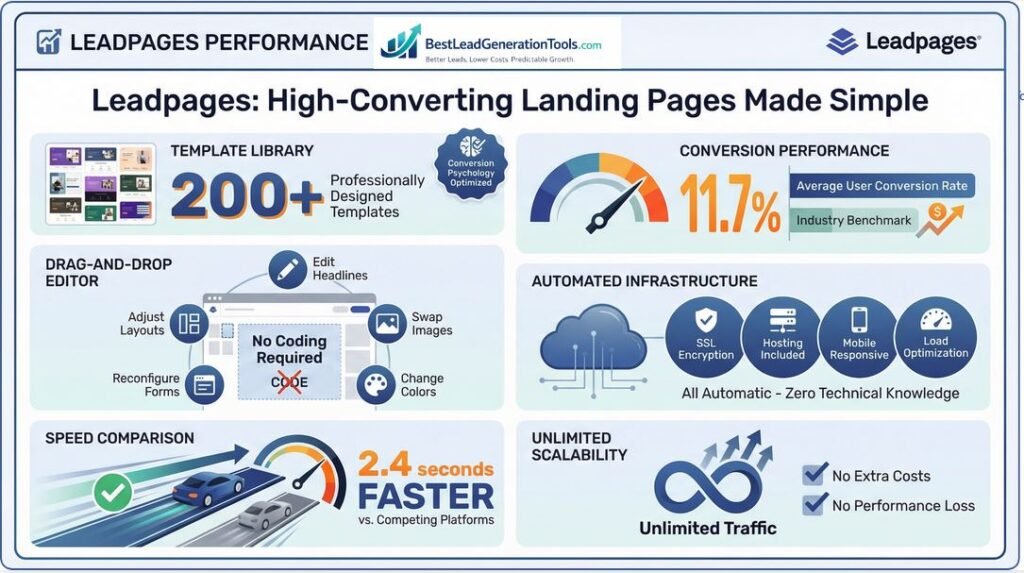
The platform provides over 200 professionally designed templates that have been tested and optimized for conversion. These designs are built on conversion psychology principles and actual performance data.
The average conversion rate across Leadpages users is 11.7%, which sits well above typical industry benchmarks.
That difference might not sound massive on paper, but when you’re spending money on advertising or investing time in content marketing, a few percentage points in conversion rate can literally mean the difference between profitable campaigns and ones that drain resources.
The drag-and-drop editor let’s you customize these high-performing templates without touching code. You can adjust headlines, swap images, change colors, reconfigure forms, and change layouts entirely through a visual interface.
For people running actual businesses as opposed to operating as full-time marketers, this accessibility matters tremendously.
You don’t need to hire a developer every time you want to launch a new campaign or test a different approach.
The platform also handles all the technical infrastructure automatically. Hosting, SSL encryption, mobile responsiveness, page load optimization all happen behind the scenes without requiring any technical knowledge.
Your landing pages load quickly, averaging 2.4 seconds faster than many competing platforms, display correctly on mobile devices, and handle unlimited traffic without extra costs or performance degradation.
The Three Pricing Tiers Explained
Leadpages structures its pricing around three main plans, and understanding which one fits your situation can save you from either overpaying for features you won’t use or underinvesting and hitting frustrating limitations.
Standard Plan
The Standard plan runs $49 monthly or $37 monthly with annual billing. This is the entry point and is genuinely designed for people just establishing their lead generation infrastructure: early-stage businesses, solopreneurs, small business owners testing whether landing pages improve their results.
You get unlimited landing pages, pop-ups, and alert bars, which means you’re never constrained by arbitrary page limits. There’s unlimited traffic and unlimited leads, so you never face surprise overage charges when a campaign performs well.
You have access to the full template library of 200+ conversion-optimized designs, the drag-and-drop editor, mobile-responsive design, and the Lead Meter optimization tool that analyzes your pages and suggests specific improvements.
The Standard plan includes 40+ standard integrations with email marketing platforms and CRM systems, so leads captured through Leadpages automatically flow into your existing marketing infrastructure. You also get 30,000 AI Engine credits monthly for the AI Writing Assistant, which helps generate headlines, body copy, and calls-to-action.
The main limitations are the lack of A/B testing capabilities and the inability to sell products or accept payments directly on your pages. For pure lead generation at the lowest price point, Standard delivers solid value.
If you’re a real estate agent capturing property inquiry leads, an insurance agent collecting quote requests, or a small business owner building an email list, this tier provides everything you actually need.
Pro Plan
The Pro plan costs $99 monthly or $74 monthly with annual billing. This is where things get interesting for people serious about optimization and scale.
The extra $25-37 monthly investment unlocks capabilities that fundamentally change how you approach lead generation.
The biggest addition is A/B testing, which allows you to systematically test different versions of your landing pages to identify which variations convert better. Rather than guessing whether a different headline might improve results, you can actually test it with real traffic and make data-driven decisions.
For B2B marketing managers running many campaigns or real estate professionals with significant advertising budgets, A/B testing becomes invaluable because it changes landing page optimization from guesswork into a science.
The Pro plan also enables online sales and payment integrations. You can connect your Stripe account and sell products or services directly from your landing pages: one-time payments for digital products, recurring payments for subscriptions, or custom payment arrangements.
For service providers, consultants, or anyone selling digital products, this extends Leadpages beyond lead capture into direct revenue generation.
You get three custom domains instead of one, which matters if you’re running distinct campaigns for different audiences or maintaining separate brand properties. There are no transaction fees for e-commerce functionality, enhanced third-party integrations, and blog functionality if you want to build content marketing into your Leadpages infrastructure.
The Pro plan makes sense when you’ve validated that landing pages improve your results and you’re ready to scale. The A/B testing alone typically pays for the upgrade by improving conversion rates enough to offset the extra cost.
Advanced Plan
The Advanced plan needs custom pricing quotes, typically starting around $697 monthly. This is enterprise-level territory designed for established companies, agencies managing many client accounts, and complex sales organizations with sophisticated requirements.
You get five sub-accounts for team collaboration, premium phone support, advanced integrations with custom development options, and unlimited custom domains. For most individual professionals and small businesses, this level is overkill.
The Advanced plan becomes relevant when you’re managing many brands, need dedicated support infrastructure, or have complex technical integration requirements that standard features don’t address.
Setting Up Your First Conversion Campaign
The initial setup process matters more than people realize because decisions made during the first hour often determine whether you’ll actually use the platform effectively or abandon it in frustration after a few weeks.
Start with the 14-day free trial that needs no credit card. This risk-free exploration period gives you access to the full platform so you can assess whether it fits your specific use case before committing financially.
During onboarding, you’ll create your account and gain immediate access to the template library. Navigate there and filter by conversion rate to view the highest-performing templates.
This filtering is really important because not all templates are created equal.
Some consistently convert at 15-20% while others struggle to break 5%.
For B2B scenarios, look specifically for templates optimized for webinar registrations, consultation requests, or demo scheduling. Real estate professionals should explore templates designed for property listings and buyer inquiries.
Insurance agents need templates built for quote asks and coverage comparisons.
When you select a template, you enter the drag-and-drop builder where the interface organizes content into logical sections: header, benefits, social proof, forms, and calls-to-action. You can change each element independently without affecting the overall page structure.
Form Configuration Strategy
Form design fundamentally decides lead quality, not just quantity. You want to capture enough information to qualify leads without creating so much friction that conversion rates plummet.
Configure your opt-in form to capture data points that actually help with lead qualification. B2B marketing managers might collect company size and industry to segment leads appropriately.
Real estate agents should capture property type preferences and budget ranges to focus follow-up efforts on viable prospects.
Insurance agents need coverage type requirements and current policy information to provide relevant quotes.
Leadpages allows conditional logic on forms, showing different fields based on previous answers. This reduces friction for respondents while ensuring you capture qualifying information.
For example, if someone indicates they’re interested in commercial real estate, you can show commercial-specific fields.
If they select residential, different fields appear. This creates a customized experience without forcing everyone through irrelevant questions.
The balance between information collection and conversion rate is genuinely critical. Every extra form field typically reduces conversion rates by 5-10%, so you need to be strategic about what you actually need at the initial capture stage versus what you can gather during follow-up.
For most lead generation scenarios, name and email address plus 1-2 qualifying questions represents the optimal balance.
Connecting Your Marketing Infrastructure
Lead capture only matters if those leads flow seamlessly into your follow-up systems. Connect your Leadpages account to your email marketing platform or CRM through the integrations menu.
Leadpages supports Mailchimp, ConvertKit, AWeber, ActiveCampaign, HubSpot, Salesforce, and dozens of other platforms.
When you configure an integration, you map form fields to corresponding fields in your destination system. This confirms information captured on your landing page appears correctly in your email platform or CRM.
You can also trigger automated email sequences or CRM workflows based on new lead submissions, eliminating manual data entry and ensuring immediate follow-up on fresh leads.
The automated data enrichment features available on higher-tier plans enhance lead quality by appending extra information to captured contacts. When someone sends their email address, Leadpages can automatically add their social media profiles, company information, and other publicly available data.
This enrichment changes basic contact information into more complete lead profiles without requiring extra form fields.
Publishing and Domain Configuration
Once you’re satisfied with your page design, you need to publish it. Leadpages offers two main options: publishing to a Leadpages subdomain or connecting your custom domain.
For professional applications, custom domains are strongly recommended because they build brand credibility and improve conversion rates. Visitors trust “propertyinquiry.yourrealestatebrand.com” significantly more than “propertyinquiry.lpages.co”.
The platform provides straightforward instructions for connecting custom domains, typically involving updating DNS records with your domain registrar. Leadpages handles all hosting, SSL encryption, and technical infrastructure automatically.
Your page goes live immediately once published and begins capturing leads.
The platform manages ongoing maintenance, security updates, and performance optimization without requiring any technical intervention from you.
Advanced Optimization Through A/B Testing
A/B testing on the Pro plan becomes your primary tool for systematic conversion improvement. Rather than making changes based on intuition or best practices that may or may not apply to your specific audience, you test variations with actual traffic and let data reveal what performs better.
The key to effective A/B testing is focusing on one element per test. If you simultaneously change the headline, image, and call-to-action button, you won’t know which change actually drove the improved or decreased conversion rate.
Test headlines independently, then test images, then test call-to-action copy, then test form length.
Run each test for enough traffic volume before drawing conclusions. You typically need 100-200 conversions per variation to reach statistical significance.
Testing with not enough traffic volume leads to false conclusions and optimization efforts that actually reduce performance.
Test the highest-impact elements first. Headlines and calls-to-action typically drive greater conversion changes than color adjustments or minor copy tweaks.
A headline test might reveal a 30-50% conversion rate difference between variations, while button color tests rarely exceed 5-10% differences.
Real estate professionals should test different property imagery approaches and headline strategies. Does imagery showing happy families in homes convert better than architectural shots?
Do headlines emphasizing location outperform ones emphasizing value?
B2B marketers should test value propositions and audience-specific messaging variations. Does highlighting cost savings convert better than emphasizing efficiency gains?
Leveraging AI Tools Strategically
The AI Writing Assistant included with Leadpages can speed up content creation significantly, but it works best when you provide clear direction as opposed to expecting it to generate finished copy from vague prompts.
Use the AI to generate many headline variations that you can then refine and test. Rather than staring at a blank page trying to craft the perfect headline, generate 10 options in 30 seconds and select the most promising 2-3 to develop further.
The AI can also suggest body copy that talks your core value proposition, though you’ll typically need to customize this output to match your specific brand voice and audience.
For image suggestions, the AI analyzes your content and recommends relevant visual approaches. This becomes particularly valuable when you’re creating many landing pages and need visual variety without conducting extensive image research for each campaign.
The Lead Meter tool provides AI-powered analysis of your finished landing page, evaluating headlines, form placement, call-to-action clarity, mobile responsiveness, and SEO optimization. Rather than guessing what might improve conversions, you receive specific recommendations ranked by potential impact.
Review these suggestions weekly and systematically apply the highest-priority recommendations.
Segmentation Strategy for Different Audiences
Rather than using a single landing page for all audiences, create variations targeting different segments with customized messaging. This segmentation approach dramatically improves conversion rates because visitors see content specifically relevant to their situation.
B2B companies might create separate pages for different industries. A marketing automation platform could have distinct landing pages for e-commerce companies, SaaS businesses, and professional services firms, with each page highlighting industry-specific benefits and use cases.
Real estate professionals might develop pages for different property types like single-family homes, condos, or investment properties, or price ranges such as starter homes, mid-market, or luxury properties.
Insurance agents could create unique pages for different coverage types: auto insurance, homeowners insurance, life insurance, or commercial insurance, with each page addressing the specific concerns and questions relevant to that coverage type.
This segmentation allows customized messaging for each audience while enabling performance comparison through Leadpages analytics. You can identify which audience segments convert at higher rates, which allows for more strategic allocation of advertising spend and marketing effort.
Pop-up and Alert Bar Implementation
Pop-ups and alert bars extend your lead capture capabilities beyond standalone landing pages to your existing website. When implemented strategically, these tools can significantly increase overall lead capture without requiring visitors to navigate away from your primary website.
Exit-intent pop-ups appear when a visitor moves their cursor toward the browser’s back button or close button, indicating they’re about to leave. These pop-ups offer downloadable resources, special discounts, or compelling reasons to provide contact information before departing.
Because they only appear at the moment of intended departure, they don’t interrupt the browsing experience.
Scroll-triggered pop-ups appear after visitors engage with significant page content, typically after scrolling 50-75% down a page. This timing indicates genuine interest as opposed to casual browsing, making the interruption more acceptable and conversion rates higher.
Time-based pop-ups can appear after visitors spend 30-45 seconds on your site, demonstrating engagement beyond superficial browsing. However, avoid aggressive pop-ups that appear immediately upon page load, as these damage user experience, increase bounce rates, and can negatively impact SEO rankings.
The goal involves capturing genuinely interested prospects at moments when they’re receptive to an offer, not blocking content access or creating frustration. Alert bars work differently by remaining visible at the top or bottom of pages without interrupting content, providing ongoing awareness of your offer without aggressive interruption.
Traffic Quality and Source Alignment
Leadpages captures leads effectively, but lead quality fundamentally depends on traffic quality and message alignment. The most optimized landing page in the world won’t convert well if you’re driving irrelevant traffic or if your messaging doesn’t align between traffic source and landing page.
Ensure your landing page messaging directly aligns with traffic source messaging. If your Facebook ad promises “7 strategies for doubling real estate commissions,” your landing page headline should reference those same 7 strategies, not pivot to a generic “grow your real estate business” message.
This alignment creates a seamless experience where visitors feel they’ve arrived at the right destination.
Monitor your conversion metrics carefully relative to traffic sources. The 11.7% average conversion rate represents a useful benchmark, but your actual rates depend heavily on traffic quality, audience fit, and offer relevance.
Cold traffic from broad targeting typically converts at 3-8%, while warm traffic from retargeting or email campaigns often converts at 15-30%.
When conversion rates fall significantly below expectations, investigate traffic quality before assuming your landing page is the problem. Are you targeting the right audience?
Is your advertising compelling enough to attract genuinely interested prospects as opposed to casual clickers?
Sometimes improving results needs fixing traffic strategy as opposed to endlessly tweaking landing page elements.
Integration with E-commerce Functionality
The payment integration capabilities on the Pro plan transform Leadpages from purely a lead capture tool into a direct revenue generation platform. By connecting your Stripe account, you can sell digital products, online courses, consulting packages, or services directly from landing pages without requiring separate e-commerce infrastructure.
This functionality particularly benefits service providers who previously needed to capture leads, follow up with proposals, and then send separate payment links. With Leadpages e-commerce integration, prospects can book consultation packages and pay immediately on the same page where they learned about your services.
This elimination of friction points significantly increases conversion from inquiry to paid client.
Real estate agents can sell property investment guides, market reports, or consultation packages. Insurance agents can offer paid policy reviews or comprehensive coverage analyses.
B2B service providers can sell discovery sessions, audit services, or productized consulting packages.
The platform supports one-time payments for single products and recurring payments for subscription services or payment plans. You can configure payment amounts, set up installment options, and customize confirmation messages and follow-up sequences triggered by completed purchases.
Troubleshooting Low Conversion Performance
When landing pages underperform, systematic diagnosis identifies the actual problem as opposed to implementing random changes hoping something improves results.
Start with traffic quality analysis. Review your traffic sources and examine bounce rates, time on page, and scroll depth.
If bounce rates exceed 70% or average time on page is under 10 seconds, you have a traffic quality or message alignment problem as opposed to a landing page design issue.
People are arriving, immediately recognizing this isn’t what they expected, and leaving without engaging with content.
If traffic quality metrics look reasonable but conversion rates stay low, assess your value proposition clarity. Can someone understand within 5 seconds what you’re offering and why it benefits them?
Vague or overly clever headlines that sacrifice clarity for creativity typically underperform straightforward value statements.
Examine your form friction. Are you requesting too much information upfront?
Every extra form field reduces conversion rates.
Test shorter forms that capture only essential information initially, gathering extra details during follow-up.
Review your social proof and credibility elements. Do you include testimonials, case studies, client logos, or other trust indicators?
Landing pages without social proof typically convert 20-30% lower than those that demonstrate existing customer satisfaction.
Check mobile experience specifically. Over 60% of traffic comes from mobile devices for most businesses, and mobile conversion rates suffer disproportionately when pages don’t display properly for small screens.
Preview your page on actual mobile devices, not just desktop browser resize tools, because the experience differs significantly.
Frequently Asked Questions
Can Leadpages handle unlimited traffic?
Yes, all Leadpages plans include unlimited traffic and unlimited leads. You never face overage charges when a campaign performs well or traffic increases significantly.
The platform manages hosting and performance optimization automatically without requiring any technical intervention from you.
What integrations does Leadpages support for CRM systems?
Leadpages combines with major CRM platforms including HubSpot, Salesforce, and dozens of other systems. These integrations allow lead data to flow automatically from your landing pages into your CRM, where you can trigger workflows, assign leads to sales team members, and track progression through your sales funnel.
How long does it take to build a landing page in Leadpages?
Using the pre-designed templates and drag-and-drop editor, you can create a functional landing page in 15-30 minutes. The templates are already optimized for conversion, so you’re primarily customizing headlines, images, form fields, and calls-to-action to match your specific offer and brand as opposed to building from scratch.
Key Takeaways
Leadpages solves the critical gap between driving website traffic and converting visitors into qualified leads through professionally designed templates, drag-and-drop customization, and integrated optimization tools that don’t need technical expertise.
The Standard plan at $37-49 monthly provides everything needed for basic lead generation, while the Pro plan at $74-99 monthly unlocks A/B testing and payment integration that fundamentally change optimization capabilities and enable direct revenue generation.
Form configuration decides lead quality as much as quantity. Capture only essential qualifying information initially and gather extra details during follow-up to balance conversion rates with lead qualification needs.
A/B testing drives systematic improvement when you test one element at a time with enough traffic volume, focusing on high-impact elements like headlines and calls-to-action before optimizing minor details.
Create separate landing pages for different audience segments with customized messaging as opposed to using generic pages for everyone, which dramatically improves conversion rates through relevance.
Traffic quality and message alignment between advertising and landing pages determine results as much as landing page optimization. Ensure seamless transitions that meet visitor expectations established by your traffic sources.